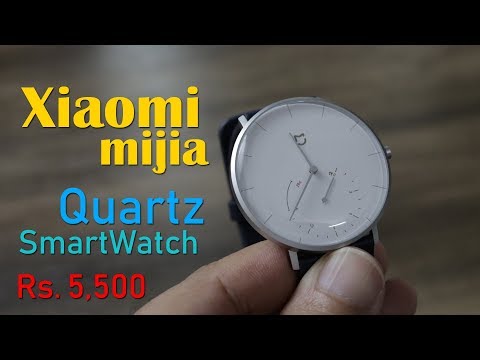
This one more smartwatch from Xiaomi Mijia,
this is a analog quartz watch (smartwatch)
This is priced at $80 that will come to approx
Rs. 5,500 in India,
In this video I will be unboxing the xiaomi mijia quartz smartwatch and talk
about features and performance
and will also tell you from where you can buy this,
so keep watching....
Hello friends, I am gogi and this is xiaomi mijia quartz smartwatch,
This is a analog smartwatch
a quartz watch
and this is the box pack
as you can see the box pack is quite big
Mi and Mijia logo printed on the box
a big box indeed
on the back there are some specs mentioned
but the mijia quartz watch specifications are in Chinese,
some you can understand, it is using
Bluetooth 4.0 BLE
and this watch is using a button cell battery
the xiaomi mijia quartz watch features also mentioned
from the icon you can get a good idea
what the watch can do
lets start with the Xiaomi Mijia Quartz smartwatch unboxing
have opened the box and inside here is the mijia quartz watch,
this looks great
looks like a simple watch (quartz watch)
but this is a smartwatch,
it is available in 3 color options
lets check the other content inside the box
this box is for the watch but the outer box
this outer box, flip it and look underneath,
here the circle is for the watch and look here
there is a small box, I have removed it,
and inside this box you will get
user manual
now this user manual is in Chinese,
In this user manual you will get all the info about the watch,
well in Chinese but
from the icons / pictures you can get some idea
about the options, I will show you the features,
well this is what you will get inside the box.
This is the xiaomi mijia quartz smartwatch,
analog smartwatch,
looks great, plain
simple, decent,
looks kind of classic watch
this is also a smartwatch,
this is how it looks from the sides,
the body is made of stainless steel
circular dial, glass on top and this is the crown,
crown is kind of a button, will talk about it later,
but with this crown you will not be able to alter the watch hand
keep watching..
This is a different classic watch
a smartwatch, this is the bottom part,
have removed the film,
its stainless steel body
it is written stainless steel and 3 ATM
it is written stainless steel and 3 ATM
3 ATM means it is water proof
you can use it in rain / shower / beach,
pretty slim watch,
looks awesome and unique,
there is button cell battery inside that is already powering this watch
and in case you need to replace the battery
here is a marking, you need to remove the strap first
and after that you will see a small dent to open the back
you will be able to open the back and
replace the battery when needed
so body is stainless steel, glass on top
and this strap is made of leather,
excellent quality, slim and light weight
so the quartz watch you get in the market
how those watch looks
this one also looks the same, here is buckle for the strap
but this watch is unique cause it is a smartwatch,
it can track your fitness activities,
in the user manual there is a QR code scan it
you will then be able to install the Mi Home app
look here in the manual
you need to press and hold the button to enable pairing mode,
then you will be able to pair the
mijia quartz watch with app,
have installed Mi Home app
and when you do that
go to settings options and if region is not Chinese then change it
important - change region to Mainland China,
cause the watch is for now available in China only
and to see it in the devices list you need to change region to China,
and only then will you be able to pair it
you can use your Mi login,
and now
I have paired the watch
it is now connected with my
smartphone, via Bluetooth,
watch is now
communicating with smartphone
the watch is using BT4.0 tech
and now it is connected
here are some options
world clock
there is one by default, if need be you can
add more cities, however all the content is in Chinese
add more cities, however all the content is in Chinese
use google translate and see how the text looks like and then search
use google translate and see how the text looks like and then search
interval reminder, it will alert you when you are inactive for a longer period,
via vibration,
there is call reminder option too
but this works on device running MIUI9 and iOS9 (apple)
but this works on device running MIUI9 and iOS9 (apple)
so you need a xiaomi device
that runs miui 9
or apple device running ios9
there is alarm option
you can setup alarm using smartphone only
since the watch is totally analog,
there are hardly any controls on the watch,
watch battery level you can get to know from the app
in device info you will get info about the device
and also info about the battery button cell model that you can use
CR2430 battery you can replace
in vibration settings options you can change as per your need,
in vibration settings options you can change as per your need,
and here
in general settings
and in this setting option
here are the options
firmware update,
time zone etc
and now I will show you an interesting option
the hand calibration
this is really important, cause
the watch has no option to change the hand, you need
to use the app to control / change the watch hand
change / calibrate,
use the app
now watch
this grown does not help
you cannot alter the watch time / change watch hand,
there is nothing you can do on the watch
at the most enable pairing mode on watch,
if you need to change the watch hand
set the time then
change watch hand, you need to use the app
look carefully when I rotate the dial on the smartphone app
see how the watch hand on the watch also changes,
there is another way
here you set the time
and then hit the confirm button
the watch hand should calibrate,
as per the time
let me try again
will change the time
and hit the calibrate button
look at the watch it is rotating the hand
as per the time you have set
it takes few seconds / minutes
you need to do this once before you start using the watch,
so two options
set the time and it will set automatically
or
you can do it manually, rotate this way
and set the time
you need to do this once,
let me setup the time
now I can use the watch,
see the time on the smartphone and the
watch is the same 10:04
setup is done,
look great and feels great when I wear it
it is pretty light weight
and looks awesome
this is quartz watch, a smartwatch,
it can monitor your steps,
there are sensors inside and look here the third hand below gives
you an idea about your step count, in 1000'ds
max 20K option
i.e. up to 20K steps
on an average 10K is good enough,
it will easily count 10 to 15K on watch and more on the app
you can check the data on app
look here it says 2540 steps I have taken,
and here you can
also check the calories burned, distance travelled. etc.
also check the calories burned, distance travelled. etc.
and on the watch
you will get to know the steps you have covered, in K range,
in analog style,
if you look here
in world clock, I have added
Mumbai, just translate it from English to Chinese
use google translate and then look for the same character on the app,
takes time but it is one time process and it really helps.
Now this Mijia Quartz smartwatch at the max can
monitor your steps
there is no heart rate sensor on this watch
and this watch can also not monitor your sleep
just your step count,
This watch is using normal button type battery
like used on other quartz watches
it does come with built in Bluetooth, always on,
it can connect with your smartphone when need be
call notification as mentioned
will vibrate the watch,
and you will need to use your smartphone to receive the call,
also this call notification will work on xiaomi devices running MIUI9
Excellent classy looking watch
and if you love such style you can go ahead with this one
it can monitor your steps,
and its water proof
the button cell battery used inside, I guess
will easily last for up to a year
and after that you will need to replace the battery,
You can buy this Xiaomi Mijia quartz smartwatch from Gearbest
it is priced at $80 (approx)
that comes to approx Rs. 5,500 Indian rupees,
the link from where you can buy is mentioned in the description section below,
and when ordering from gearbest
make sure to choose priority line shipping option,
do let me know if you liked this watch,
if you like the video
then like, share, comment and do subscribe
and don't forget to enable the bell icon
keep watching..
 For more infomation >> কল্পনা আর বাস্তবতার মধ্যে পার্থক্য | Kolpona Ar Bastobota - Redowan - Duration: 2:58.
  For more infomation >> VLOG 2018| AÑO 2 MANTENIMIENTO SIN EFECTO REBOTE | JUICE PLUS | IMPOSIBLE VOLVER A LA RUTINA 😱 - Duration: 8:43.
  For more infomation >> Avión robado en Seattle por mecánico del aeropuerto - Duration: 11:56.
  For more infomation >> No Hago Ese Tipo De Negocios | Camino A La Cima 010 Con Pedro Reymond - Duration: 8:08.
  For more infomation >> LE ROCK DES BLOCS - Voyage dans le temps 🎵 - Duration: 1:56.
  For more infomation >> I ASKED MOMO TO AKİNATOR (Momo) - Duration: 6:00.
  For more infomation >> Gustavo González, contra Rafa Mora para defender a María Lapiedra: "¡Eres sucio, cobarde y - Duration: 2:39.
 For more infomation >> Championnats d'Europe : Pierre-Ambroise Bosse : Je chanterai la Marseillaise sous ma douche - Duration: 9:29.
  For more infomation >> Nicolas Sarkozy, « un papa très chanceux » avec sa petite Giulia - Duration: 1:27.
 For more infomation >> Ce fruit miraculeux prévient le cancer d'après la science - Duration: 6:57.
  For more infomation >> Club Mickey Mouse | Back to School Special
 For more infomation >> Eric Yian - Remember Who You Are, Believe In Yourself (Lyrics Video) - Duration: 3:38.
  For more infomation >> Seattle plane crash : 'Family of a man who stole and crashed a plane is 'stunned and heartbroken' - Duration: 2:05.

 For more infomation >> GETA 3 SİDİ KURUL TANITIM. - Duration: 4:38.

 For more infomation >> AUSTRALIA | Vlog - I Can't Go On | Episode 9 - Duration: 9:33.


 For more infomation >> Heißester Urlaub ever? Heidi Klum als knackige Taucherin - Duration: 0:54.
  For more infomation >> 배우 송중기가 데뷔 10주년 기념 팬미팅을 연다. - Duration: 2:25.
 For more infomation >> 🍎 Recreating My Old Ryuk Bodypaint | Maria Pol - Duration: 6:49.

 For more infomation >> 塔罗心占:分开了,他心里有后悔吗?准哭了! - Duration: 5:03.
  For more infomation >> 无天的四大遗憾,错过一人,相信一人,没杀一人,轻视一人最致命 - Duration: 8:16.
  For more infomation >> Best podcasts to listen to for agency owners and leaders - Duration: 1:37.
  For more infomation >> A Lava Story - Duration: 22:38.
  For more infomation >> 塔罗占卜:TA还会回来找你吗?答案就在牌里! - Duration: 4:25.
  For more infomation >> Mercedes-Benz revela o Classe A Sedan - Duration: 2:31.
  For more infomation >> Audi e Ericsson querem utilizar o 5G na produção de veículos - Duration: 3:39.
 For more infomation >> Gasolina aditivada rende mais? Vale a pena? - Duration: 2:53.
  For more infomation >> Video chân dài mặc hớ hênh ở Tuyệt tình cốc Đà Lạt là Á hậu Thư Dung? Tin mới nhất - Duration: 13:29.
  For more infomation >> Porsche Macan passa por retoques no visual - Duration: 1:54.
  For more infomation >> VW Gol e Voyage chegam com câmbio automático - Duration: 3:00.
  For more infomation >> Edyta Górniak przyjmie zaproszenie Romów? "Tabor cygański nie może obyć się bez naszej siostry" - Duration: 6:56.
  For more infomation >> 대한민국의 잠수함 건조능력은 어느정도 일까요? - Duration: 6:29.

No comments:
Post a Comment